
What does the evolution of a complex, multi-authored document look like over time? Below are revision histories of two Wikipedia articles, “Brazil” and “love,” as rendered by History Flow Visualization, a new application from alphaWorks, the emerging technologies division at IBM.
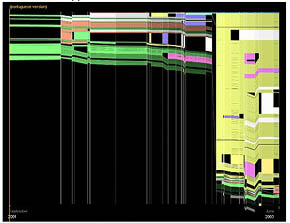
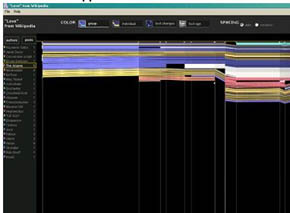
Changes are depicted as parallelograms along two axes, the vertical axis representing the document’s length, and the horizontal axis representing time. The tool offers “community” or single-author views, and uses color to emphasize or isolate specific information – i.e. to distinguish authors, or to measure age of a contribution. (view screenshots)
If you open Wikipedia’s revision history of the Brazil article, you find a daunting list of hundreds of recorded changes. It’s hard to get any sense of how this history compares in overall shape, complexity, and pattern of growth to that of love. But with the alphaWorks tool, it’s clear at a glance that the Brazil article almost tripled in size in 2003, and seems to have been suddenly saturated in yellow (perhaps representing the preponderant influence of a single author?). We’re looking not at a list, but a situation: in 2003, a self-designated authority on Brazil swaggered in and assumed leadership of the country’s wiki-destiny, whereas love seems to have grown at a fairly constant rate with a pretty consistent mix of contributors – no swaggering, yellow Brazilians.
I’d say that the alphaWorks tool suggests something powerful, but is probably of limited use. It’s good at providing the quick glance, but seems a little too mashed and muddled for line-by-line analysis. Good visualization tools are those that give a sense of the whole but also allow for minute investigation. At their best, they convey information meaningfully, even movingly. Nurturing a complex, multi-authored work is in some ways like raising a child. You mark its height against the wall, take photographs, file away old homework assignments, gather artifacts – in short, you construct a history, of “a hundred indecisions..and..a hundred visions and revisions.”
(from Slashdot via reBlog)
Author Archives: ben vershbow
windowless classrooms?
There’s a nice piece in today’s NY Times about how Brazil is rejecting Microsoft and striking out its own path across the so-called “digital divide.” The secret? Open source software.
“Looking to save millions of dollars in royalties and licensing fees, Mr. da Silva [President] has instructed government ministries and state-run companies to gradually switch from costly operating systems made by Microsoft and others to free operating systems, like Linux. On Mr. da Silva’s watch, Brazil has also become the first country to require any company or research institute that receives government financing to develop software to license it as open-source, meaning the underlying software code must be free to all.”
reading on your PSP
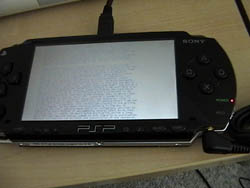 Not surprisingly, folks have already figured out how to read books on the new Sony PSP (PlayStation Portable). The hack is pretty basic – you just turn pages into jpeg images and dump them into the picture folder. The snapshots stack up as a book. Packet Switched Press has even published a short story – a sci-fi piece called “Moving Pictures” – formatted specially for the device (you’re supposed to rotate it 90 degrees to view vertically) (thanks, Boing Boing).
The PSP marks another step toward an ideal portable media device (see the ideal pod), the ebook hack being only one of many tricks to cram in more content options (Wired article for more). The Packet Switch Press story suggests that on the tiny screen, 90 degrees can be all that separates a widescreen movie from an electronic paperback – there’s no “this side up.” The big problem with the PSP is its proprietary file format, laughably named Universal Media Disc (UMD). To watch a movie on your PSP, you have to buy the UMD-formatted edition, even if you already own the DVD. This will ultimately inhibit the development of interesting new works for the tiny screen, clever hacks notwithstanding.
the ideal pod
Yesterday, Boing Boing linked to five enticing design fantasies of future Apple products by design firm Pentagram:
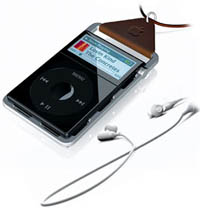


If Apple is to stay at the head of the pack, then the answer is to combine the wireless iPod, the vPod, and the iPhone into one ideal pod. In addition to having access to all your music, video and photos, you can surf the web, take movies and pictures, play video games, talk on the phone, watch films in letterbox format, and read various kinds of books – anything from novels, to newspapers, to websites, to manga or comics. IPod’s signature scroll wheel would work wonderfully with text, paging through horizontally and preserving some semblance of a coherent page or panel, like the International Herald Tribune does on its elegant website. It could have a little stylus tucked away like tweezers in a Swiss Army knife, and a virtual keyboard that projects on surfaces. A month ago, I wrote about the need for a “paperback ebook” – a pan-media everything-pod, something that does for portable media what paperbacks did for books. Perhaps Apple will be the first to venture such a device.
Laptops are on a collision course with cell phones. Eventually they will converge in a single ideal device. Specialized devices like snapshot digital cameras, iPods, Game Boys, and ebook readers are exciting while they are relatively new, but they are ultimately impractical. Nobody wants a device that just does one thing. Everyday, you have to pack your pockets with various gadgets – you begin to feel like a slave to the so-called convenience of these things. Phones and computers, on the other hand, are indispensable, and can theoretically encompass all of these specialized devices. So it seems like just a matter of time until everything is packed into one ideal pod.
yahoo! launches creative commons search
Yahoo! has unveiled a new Creative Commons search tool that makes it easier to find “some rights reserved,” or flexible-copyrighted, content. This is very progressive move on Yahoo’s part, and a big boost for the alternative copyright movement. Three cheers for Yahoo! for endorsing a less restrictive model for creative work!
At the moment, Yahoo! allows you to search for CC material either on the web or in Creative Commons’ own library. At least for now, it’s not possible to search within different media types – i.e. video, image, etc – though you can distinguish in your search between content available “for commercial purposes,” and content that you can “modify, adapt, or build upon.”
UPDATE: Larry Lessig, chair of the Creative Commons project, comments on Yahoo! move:

 “This is exciting news for us. It confirms great news about Yahoo!. I met their senior management last October. They had, imho, precisely the right vision of a future net. Not a platform for delivering whatever, but instead a platform for communities to develop. With the acquisition of Flickr, the step into blogging and now this tool to locate the welcome mats spread across the net, that vision begins to turn real.”
See article:
“Yahoo adds search for ‘flexible’ copyright content”.
bible fragments reunite in digital space
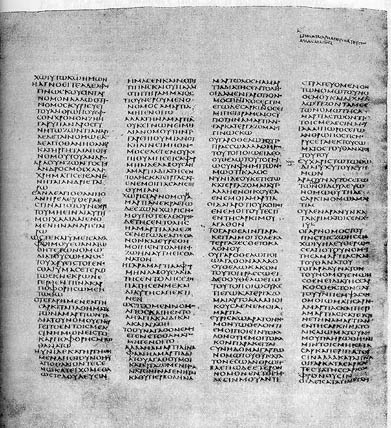
Plans were recently announced for the digitization of the Codex Sinaiticus, the world’s oldest existing Bible, which currently resides in four separate chunks in Egypt, Russia, Germany and Britain. Dating back to the mid-4th century, the Codex contains large portions in Greek of the Old Testament, and the complete New Testament, including several non-canonical epistles.
From article:
“The project encompasses four strands: conservation, digitisation, transcription and scholarly commentary to make the Codex available for a worldwide audience of all ages and levels of interest. There are plans for a range of projects including a free to view website, a high quality digital facsimile and CD Rom. It is intended that this project will be a model for future collaborations on other manuscripts.”
Information Esthetics lecture series
Brad Paley, creator of Text Arc and many other gorgeous data visualizations popular here at if:book, has put together a fascinating lecture series running March through July in New York. The series starts next Thursday in Chelsea with renowned typographer Robert Bringhurst. From Brad:
“I’m excited to have put together something that seems tailor-made for the interests of Institute for the Future of the Book participants and on-lookers.”
Information Esthetics: Lecture Series One starts March 31 in Chelsea
People who value clarity and engagement is visual displays, whether as fine art or on Wall Street, are invited to seven evenings with some of the field’s deepest thinkers and finest practitioners. The series opens with distinguished typographer Robert Bringhurst at 6:00 pm, March 31 at the Chelsea Art Museum. Fine spirits and snacks will be served. It’s free with the $3 discounted museum admission.
A little more about Information Esthetics..
Making data meaningful–this phrase could describe what dozens of professions strive for: Wall Street systems designers, fine artists, advertising creatives, computer interface researchers, and many others. Occasionally something important happens in these practices: a data representation is created that reveals the subject’s nature with such clarity and grace that it both informs and moves the viewer. We both understand and care. This is the focus of Information Esthetics.
Information Esthetics, a recently formed not-for-profit organization, has organized a lecture series dedicated to helping this happen more often.
For the full program, visit InformationEsthetics.org. Thanks, Brad! We’ll definitely be there.
adopting a new model for textbooks
Anyone interested in the future of textbooks should take a look at Jay Mathews’ “Class Struggle” column “Why Don’t We Fix Our Textbooks?” in yesterday’s Washington Post. Why are most K-12 textbooks in America so mediocre? It’s in large part due to the adoption process used in 21 states, including the biggies Texas, Florida and California, in which textbooks are selected by statewide committee rather than by teachers themselves. The ones that make it through are like processed cheese, politically censored by pressure groups, and written in dumbed-down language in “chop shops” at the “el-hi publishing cartel” – Pearson, McGraw-Hill, Reed Elsevier, and Houghton Mifflin. Even states and schools that are not directly subject to these policies are affected, since the dominant textbooks on the market are the ones produced in the mediocrity mills of the adoption committees.
Mathews points to an excellent report by David Whitman called “The Mad, Mad World of Textbook Adoption”, published by The Thomas B. Fordham Foundation, which gives a good overview of the situation. It’s fascinating to learn that adoption committees first appeared during Reconstruction when Southern States pressed for the right to publish their own version of the Civil War. Today, it’s political correctness and economy of scale that guide textbook selection, with cranky pressure groups forever chipping away at perceived infelicities, and publishers looking for formulaic bestsellers appealing to the broadest possible audience. Meanwhile, high-quality alternatives from smaller presses struggle to survive.
Peppered throughout the article are bits of a conversation between Mathews and Diane Ravitch, author of the introduction to the “Mad, Mad World” report, and of “The Language Police: How Pressure Groups Restrict What Students Learn”:
“I asked Ravitch a couple of days ago if there has been any progress lately. She said California, Florida and Texas have all considered bills that would weaken the adoption process, but so far there has been little change. She said she thinks the best hope is that the Internet and electronic publishing will eventually render obsolete the textbook giants and their adoption panel co-conspirators.”
There is reason to hope that digital technologies might usher in a textbook renaissance, boosting quality and diversity while dramatically reducing cost (see Textbook Ripoff report), and ultimately redefining education in the digital era. And if the open source model is embraced, then textbook adoption might actually evolve into an interesting process of peer review and creative collaboration. But there is equal reason to fear that the el-hi publishing cartel will cut innovators off at the pass and dominate the e-textbook market through DRM and extortionist content-update schemes.
Dave Munger summed it up well in a conversation we had last month about laptops as textbooks:
“In my dream scenario, the big publishers will embrace open source. They will become service companies, doing contract work to customize texts for particular markets.
“I imagine what will really happen is that publishers will fight this tooth and nail, like Microsoft is doing with Linux. It will be an all-or-nothing battle, with one side winning and the other losing.”
your way of life could soon be illegal..
Between now and March 29, when oral arguments begin before the Supreme Court in MGM v. Grokster, the Electronic Frontier Foundation is assembling a list, one invention per day, of technologies that could be considered illegal if the movie and music industries prevail in redefining the scope of permissable copying. Email, blogs, VCRs, and xerox machines are among the gadgets listed so far.
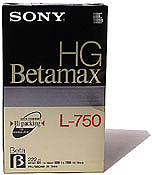 “Ever since the Betamax ruling in 1984, inventors have been free to create new copying technologies as long as they are capable of substantial noninfringing (legal) uses. But by the end of this year, all that could change. In MGM v. Grokster, Hollywood and the recording industry are asking for the power to sue out of existence any technology that appears to be a threat, even if it passes the Betamax test. That puts at risk any copying technology that Betamax currently protects as well as any new technologies Hollywood doesn’t like.
“To raise awareness about what’s at stake in the Grokster case, EFF is profiling one Betamax-protected gadget every weekday until the oral arguments before the Supreme Court on March 29. Some of these examples are in fun, some more serious, but all represent general-purpose technologies that can be used for both infringing and noninfringing purposes. Check them out and pass the word along.”
(via Boing Boing)
baking google’s cookies
 Bibliotheke points to the recent adventures of Greg Duffy, a talented Texas college student who figured out how to read entire copyrighted books in Google Print by “baking” the cookies (data sent from to your computer from a web browser to store preferences for specific sites and pages) Google uses to impose search limits on protected material. Duffy took on the challenge largely out of curiousity, but doesn’t deny that he fantasizes about his chutzpah landing him a job at Google. He hasn’t been hired yet, but he did manage to attract a great deal of attention and over 10,000 hits to his site from more than 60 countries. And in the sudden commotion, he mysteriously disappeared from Google’s web search results, only to reappear shorly after Google Print had been fixed to repel the hack. Any connection between the two events was cheerily denied by a Google representative writing in the comments on Duffy’s blog under the nom de plume “Google Guy.” Conspiracy theories abound, but Duffy has retained an excellent sense of humor throughout the whole affair, and still makes no secret of his hopes that sheer audacity and display of chops might yet get him hired by the juggernaut he so admires and loves to tease.
It’s a bit tech-heavy, but it’s worth reading his post and the updates that follow, if for no other reason than for his amusing riff on the cookie motif.
“So recently I wrote some software to grab and store up a bunch of cookies, keep them for more than 24 hours, and then automate searching for pages by this method. If I wanted to view page 100, the software would search for it and attempt to extract the image with a regular expression. If that doesn’t work, it will search for page 99 and extract the “next page” link to get to page 100. It will continue doing this for page 101, 98, and 102 until it finds the correct page. Whenever a cookie would hit the hard limit, I’d replace it with a new cookie from the queue. By grabbing the “next” and “previous” links automatically in this “inductive” fashion and using the search for skipping, I could view an entire book on Google Print with one click every time. I later modified the software to spit out a PDF of the book. I used simple components like GoogleCookie (cookie with accessible properties), GoogleCookieOven (queue with “baking time”, i.e. it only pops when the head of the queue is old enough to get the ability to search), and GoogleCookieBaker (thread that keeps the oven full of baking cookies by querying Google for new ones when the number drops below a certain threshold).”